Filling In the Extended Params Tab
The Extended Params tab contains some additional or extended configuration parameters for the Composition Tracking solver. The configuration options are:
- Extended Parameters section: This set of options allows us to reduce the constraints applied by the solver during the composition tracking calculation. In other words, this means the user can increase the reliability of composition tracking results by hiding some conditions that can potentially generate a solver failure.
- FIFO tank management settings section: Enable special management for tank with FIFO mixing model (typically used to Model pipelines).
- Material accounting settings section: Enable the composition tracking to manage negative quantities in the tank composition result table (this option can be used to track material loans in an ownership tracking context where multiple shareholders are involved).
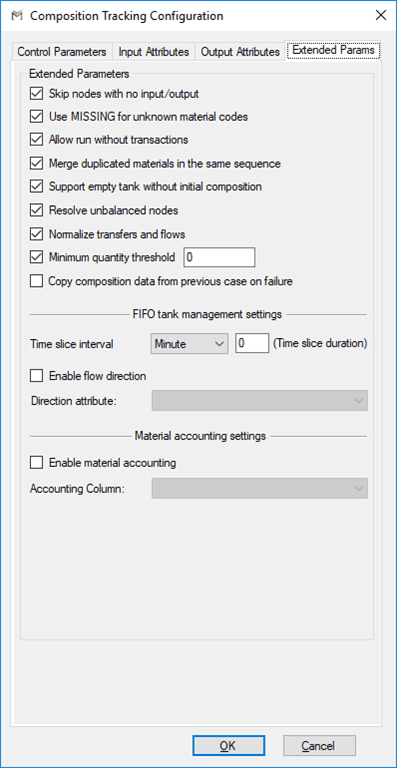
The following tables define the parameters configured on the Extended Params tab.
Extended Params Tab – Material accounting settings
| Parameter | Description |
|---|---|
| Skip nodes with no input/output | When a balance point (process unit or node) has input streams but no output streams or vice versa, the composition tracking solver fails. If this option is enabled, the process unit or nodes in this condition are excluded from the composition tracking. |
| Use MISSING for unknown material codes | When a material code is not configured in Sigmafine material table, the composition tracking solver fails. If this option is enabled, a default material code ‘MISSING’ is provided to the solver. |
| Allow run without transaction | When there are no transfers in a ‘Case’, the plug-in stops with a failure. If this option is enabled, also the flows in the Model are counted like transfers. |
| Merge duplicated material in the same sequence | When tank composition tracking contains duplicated materials code, composition tracking solver fails. Typically, this failure arises by an initialization error on the composition tracking results. If this option is enabled, duplicated materials are merged before being processed by the solver. |
| Support empty tank without initial composition | When a tank has no composition data in the previous case, the plug-in stops with a failure. Typically, this condition occurs when an out of service tank returns to “in service”. If this option is enabled, the tank without initial composition will be processed by the plug-in. |
| Resolve unbalanced nodes | When a balance point (process unit or node) has input and output streams with inconsistent Start Time and End Time, the composition tracking solver fails (see picture below). If this option is enabled, a dummy transaction is passed to the solver in order to cover uncovered time intervals. |
| Normalize transfers and flows | Mismatch between the sum of component quantities and the reconciled quantity on the transfer or flow. If this option is enabled, normalization is made on composition tracking results entries. |
| Minimum quantity threshold | Composition Tracking solver terminates with an error when it tries to process a balance node where some of the input/output streams have infinitesimal quantities (e.g. 1E-09 bbl). Due to the internal precision of the solver, such quantities are rounded to zero. If this option is enabled and configured, quantity value below the configured threshold are promoted to its value. |
| Copy composition data from previous Case on failure | In Case of failure of composition tracking solver, the results are not processed and saved in the case. If this option is enabled and configured, the results from the previous Case are copied to the current case. |
There are no out streams from the node for the time window from 08:00:00 PM to 00:00:00 AM. In this condition, the composition tracking solver raises a failure.
Extended Params Tab – Extended Parameters
| Parameter | Description |
|---|---|
| Time slice interval | Time slice configuration allows the definition of time slice resolution for the solver. This parameter is essential in order to enable high resolution on composition sequence for FIFO tank (pipelines).NOTE: When the Time Slice duration is set to zero then, time slices are not calculated and passed to the solver. |
| Enable flow direction | This option enables the sequence inversion on FIFO tank composition tracking.The sequence inversion is performed and communicated to the solver when the flow direction over a pipeline changes between two consecutive cases.When this option is enabled, and a flow inversion occurs in a FIFO tank, the sequences are reverted in order that the last one in will be the first one to exit. |
| Direction attribute | The Direction Attribute configuration parameter allows to define the Attribute containing the direction information. |
Extended Params Tab – FIFO tank management settings
| Parameter | Description |
|---|---|
| Enable material accounting | This option is generally used when composition tracking analysis is used to track the material ownership.When this option is selected, the plug-in assures that the outgoing quantity from a tank of a material flows according the configured accounting flag. |
| Accounting column | SF_Material table column where the accounting flag type to be applied to the material is configured. |
Material table Accounting column: For each material is possible to configure the required type of accounting to be applied. The following values can be configured:
| Accounting | Description |
|---|---|
| 0 | No Material Accounting. |
| 1 | Special material management. |
| 2 | Quantity clamping management. |
| 3 | Negative value management (no clamp). |
The below examples show the results calculated by the composition tracking according the accounting options listed in the above table.
To simplify the example, we supposed to have two tanks (TK A and TK B) both having mixing model = Well Mixed and two materials (OWNER1 and OWNER2) in both the tanks. The objective is to describe the results calculated by the composition tracking analysis whenever the material OWNER1 is configured with the different accounting flag.
Option 0: No Material Accounting
In this Case the composition tracking process the OWNER1 material according the mixing Model configured on the source/destination tank.
Option 1: Special material
See Special Materials under Inventory Calculation Methods for more information.
Option 2: Quantity clamping
Option 3: Negative value (no clamp)